New software update for Gravity - 3.5

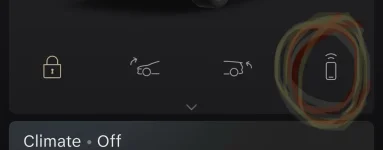
That new symbol for unlocking and driving using your phone was on my phone and then it disappeared. Any idea why it would come and go
 

Attachments

  • IMG_4678.webp
    IMG_4678.webp
    12 KB · Views: 71
That new symbol for unlocking and driving using your phone was on my phone and then it disappeared. Any idea why it would come and go
No idea why the icon would have disapeared, but signout and then sign back in and you should be good to go
 
So, today I noticed while pulling into my garage (while using AA) that the usual front (and rear) view camera displays (which would normally appear where the AA display is on the cockpit display) did not appear. I just got the 360 surround view camera on the screen below. I tried turning off AA and manually hitting the parking camera button but I still only got the 360 overhead view on the pilot panel (I tried several times switching between drive and reverse but that did not bring up either dedicated camera). Is this a glitch or did they change the way the camera system works? I'm now not sure how to manually pull up the dedicated front and reverse cameras. This is the first time I've noticed this. I plan to reboot tomorrow before my next drive and see if this "situation" persists...but I can say going into reverse without the rear-facing backup camera is definitely a bug or glitch that will probably need to be fixed if it's repeatable. Anyone else noticed this?

 
So, today I noticed while pulling into my garage (while using AA) that the usual front (and rear) view camera displays (which would normally appear where the AA display is on the cockpit display) did not appear. I just got the 360 surround view camera on the screen below. I tried turning off AA and manually hitting the parking camera button but I still only got the 360 overhead view on the pilot panel (I tried several times switching between drive and reverse but that did not bring up either dedicated camera). Is this a glitch or did they change the way the camera system works? I'm now not sure how to manually pull up the dedicated front and reverse cameras. This is the first time I've noticed this. I plan to reboot tomorrow before my next drive and see if this "situation" persists...but I can say going into reverse without the rear-facing backup camera is definitely a bug or glitch that will probably need to be fixed if it's repeatable. Anyone else noticed this?
I had that after the update and a restart fixed it. There is a parking camera button (the one with the P) but when mine was bugged it didn't work, after a reboot everything was fine.
 
That new symbol for unlocking and driving using your phone was on my phone and then it disappeared. Any idea why it would come and go
After the 3.5 I did not see the icon at all, I was on the correct version for the app. Deleted the app and restored and this solved the problem
 
Back
Top