How to switch audio sources in Air U/X 3.0?

maractwin

Active Member

Verified Owner
Joined
Feb 13, 2022
Messages
292
Reaction score
394
Location
Boston
Cars
Air GT, '57 Imperial
Referral Code
4I1WO1JI
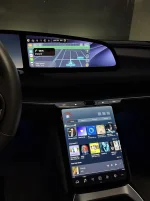
So I took the 2.11 update today, with very mixed results. Audio keeps crapping out in Apple CarPlay. When that happens, I'd like to just switch to another source such as SiriusXM. But once CarPlay has used audio, it doesn't seem to be possible to choose another source. When I click the music notes icon to go to audio, it just says CarPlay is controlling audio and does not present the option to choose another source. The only way I could figure out to do this was to ask the car to forget my phone, at which point I lost navigation also. Is there a way this is supposed to work? Is this a bug, or a design flaw, or is there some button I'm just not seeing?

-Mark
 
someone else said to exit CarPlay you just hit the CarPlay icon again. I havent tried it yet.
 
Pressing the carplay button closes the carplay window, yes. But that doesn't change the audio source, which still says it is carplay and does not present the option to choose anything else. The only way I could figure out around that was to disconnect my phone entirely.
 
This red circled button
 

Attachments

  • IMG_9707.webp
    IMG_9707.webp
    158.1 KB · Views: 95
While perhaps not intuitive, this does work for me to switch audio on both Gravity and Air. I haven’t experienced any issues switching so far. I do like the ability to have both a CarPlay navigation and a native audio app display on the two screens simultaneously as the above picture shows. A major advance for Air owners.
 
Back
Top