Air trying to use Tesla charger via Lucid NACS to CCS adapter fails

MGRMLN

Active Member

Verified Owner
Joined
Mar 14, 2024
Messages
529
Reaction score
510
Location
Atlanta, GA
Cars
AGT/570S Spider/Cayenne
Referral Code
Y5OFBG6Z
Hello braintrust,

My office recently moved to fancy new offices that come equipped with rows of Tesla L2 Wallbox chargers.
I tried plugging in my 2023 Air using the Lucid branded NACS to CCS adaptor and it refused to charge.
One time it asked me to unplug and replug but each time the car just says cable connected and the charging indicator near the port just stays white. The Tesla charger continues to just blink white.
Any idea what might be going on?
 
CCS is for DC fast charging only. A NACS to CCS adapter is useful at a Tesla Supercharger or other NACS DC fast charging station.
You need to use Lucid's NACS to J1772 adapter for Level 2 (AC slow) charging.
 
Last edited:
CCS is for DC fast charging only. A NACS to CCS adapter is useful at a Tesla Supercharger or other NACS DC fast charging station.
You need to use Lucid's NACS to J1772 adapter for Level 2 (AC slow) charging.
oooooh!
Thanks for the clarification. I probably have that one too!
 
Small adapter for slow AC charging, big adapter for fast DC charging.
 
Realized I didn't have that one too.
Just ordered so I'll be able to top up at work.

Thanks all!
 
Very specific question but before I chuck my NACS to J1772 adapter in the frunk with the growing pile of adapters:

Is it possible to plug in a NACS supercharger to this J1772 adapter (instead of the CCS one that should be used) and fry things? Or does NACS have some sort of plug that prevents that from happening.

I will not do this, of course, but I am not the only one that drives the car and trying to make it as foolproof as possible.
 
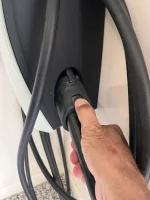
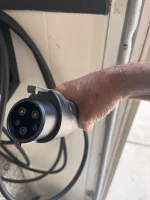
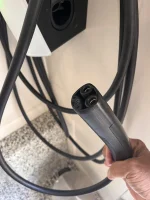
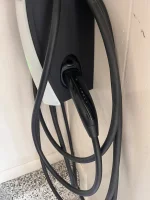
If your office just installed these Tesla L2 chargers, you might double check to see if they are the universal version. If they are, then the adapter is actually a part of the unit and you can click the button to pull out the entire charger head including the J1772 adapter. If you don’t push that button, then just the NACS charger head comes out of the unit. See the pics from my garage:
 

Attachments

  • IMG_6261.webp
    IMG_6261.webp
    1.2 MB · Views: 56
  • IMG_6262.webp
    IMG_6262.webp
    754.6 KB · Views: 47
  • IMG_6263.webp
    IMG_6263.webp
    787.8 KB · Views: 41
  • IMG_6264.webp
    IMG_6264.webp
    874.2 KB · Views: 49
You can't mix and match. The J1772 is a level 2 AC adapter and the NACS to CCS is a level 3 DC adapter.
I know, but my question is what happens if someone accidentally plugs a level 3 DC NACS into the level 2 NACS-to-J1772 adaptor instead of the correct NACS-to-CCS one- or is there some sort of internal mechanism that makes that either not an issue or not possible?
 
I know, but my question is what happens if someone accidentally plugs a level 3 DC NACS into the level 2 NACS-to-J1772 adaptor instead of the correct NACS-to-CCS one- or is there some sort of internal mechanism that makes that either not an issue or not possible?
The car will not charge. The communication hand shake will fail. No damage will occur but it is better not to try.
 
If I’m correct the power contacts are different between AC and DC charging, irrespective of the handshake
See those big fat contacts on the bottom of the CCS connector, those are the high voltage DC contacts
 
If I’m correct the power contacts are different between AC and DC charging, irrespective of the handshake
See those big fat contacts on the bottom of the CCS connector, those are the high voltage DC contacts
You are correct, in the NACS connector, the DC and AC pins are shared. In the CCS connector the DC and AC pins are separate. The J1772 connector is for AC charging only and only has AC pins, it does not have DC pins.
 
Ok. So here's an update. My workplace has the dual outlet end Tesla level 2 chargers. An entire row of them! So I pushed the button to use the built in Tesla J1772 level 2 adaptor. My Lucid still refuses to charge. Then I tried the Lucid NACS to J1772 adaptor and it doesn't work either. The first time I plug it in, it says preparing to charge, then turns red and says try plugging in again. After that, the car stay solid white with no charging and the Tesla level 2 charger just blinks white. I'm stumped. Why is this so difficult?
 
Any ideas? Is the car asking too much of the chargers? I'm stumped. The Teslas there seem to charge just fine.
 
Are those chargers free? I assume so, but if they charge you some nominal amount like a destination charger, do you have the Tesla monthly membership? Not sure if that has anything to do with it or not.

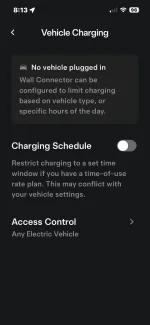
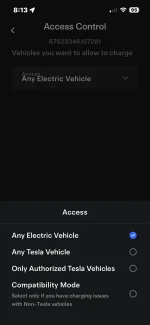
One more thing to check - on the actual charging unit via the Tesla app, there is a setting for Access Control. Under that tab, there are options for what is allowed to charge - the “Any Electric Vehicle” needs to be selected, not “Any Tesla Vehicle”, or “Only Authorized Tesla Vehicles”. There is also a “Compatibility Mode” if there are issues with charging non-Teslas.


Do you know who to talk to at the office complex to have them check these settings? I bet they are set for Teslas as a default.
 

Attachments

  • IMG_6269.webp
    IMG_6269.webp
    61.4 KB · Views: 40
  • IMG_6270.webp
    IMG_6270.webp
    49.8 KB · Views: 35
Are those chargers free? I assume so, but if they charge you some nominal amount like a destination charger, do you have the Tesla monthly membership? Not sure if that has anything to do with it or not.

One more thing to check - on the actual charging unit via the Tesla app, there is a setting for Access Control. Under that tab, there are options for what is allowed to charge - the “Any Electric Vehicle” needs to be selected, not “Any Tesla Vehicle”, or “Only Authorized Tesla Vehicles”. There is also a “Compatibility Mode” if there are issues with charging non-Teslas.


Do you know who to talk to at the office complex to have them check these settings? I bet they are set for Teslas as a default.
OOOH! I didn't know this. I'll ask the property about it. This makes sense. Thank you!
 
OOOH! I didn't know this. I'll ask the property about it. This makes sense. Thank you!
Also the charger should have a contact phone number for issues
Note virtually all public chargers have a phone number to call for any charging issues
 
Also the charger should have a contact phone number for issues
Note virtually all public chargers have a phone number to call for any charging issues

Even just a row of free Tesla chargers set up by the office park? I have charged at destination L2 chargers at hotels that had issues and there was no phone # to call - I walked in and dealt with the hotel facilities folks.
 
Even just a row of free Tesla chargers set up by the office park? I have charged at destination L2 chargers at hotels that had issues and there was no phone # to call - I walked in and dealt with the hotel facilities folks.
Yes I’ve seen and used both kinds of support for free L2 chargers.
 
Back
Top