
iOS version 2.18.0

mishal

Member

Verified Owner
Joined
Aug 16, 2026
Messages
22
Reaction score
19
Location
Dammam, Saudi Arabia
Cars
Gravity Touring
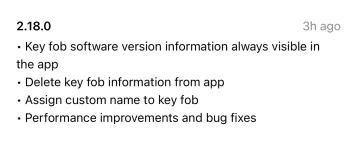
A new update on the Lucid app just released on iOS and I understood nothing from the release notes:
- Delete key fob from app. How?
- Assign custom name to key fob. How?

IMG_7501.webp
 
Click the “Mobile key” area and a second screen is displayed which has a “Remove” button next to the fob description.
 
That’s right Duncan, I just figured it out after connecting the key fob to the app and I changed the name of the key fob. It I am not sure what they mean about “delete key fob information from app”
 
Its secret language for "Paak"
 
I just updated the app. I don't see anything new. Before I updated it, I went to mobile key and it showed the BT connection to the car with the Remove button. After updated the app, it was exactly the same. I don't see anything about the key fob, which to me is the black thing for your pocket that will open up the car.
 
Same here. It could be that there is another required update on the car’s side yet to be released, and/or it’s gravity specific.

As usual, better release notes would help.
 
Same here. It could be that there is another required update on the car’s side yet to be released, and/or it’s gravity specific.

As usual, better release notes would help.
It is Gravity specific. Gravity’s physical fob receives firmware updates via the app. Nothing exciting here.
 
Back
Top